Designing User Response Options in Coaching Dialogues
Well-designed response options are key to getting accurate feedback from users and keeping them engaged. This chapter shows you best practices for creating response options in digital coaching programs.
1. Overview: Six Principles for Good Response Options
- Provide real alternatives: Answer options should be genuine alternatives on one continuous dimension (e.g., agree – disagree). (See section 2)
- Keep answer dimensions consistent: Don't mix different dimensions in one set of options. It confuses users. (See section 3)
- Consider the strength of the statement: Use softer wording, or offer more options for strong statements, so users don't push back. (See section 4)
- Include neutral and open options: Add neutral or open-ended options to cover all possible answers and prevent user reactance. (See section 5)
- Balance the number of options: Weigh detailed insights and a highly personalized coaching flow against higher cognitive load and decision fatigue. (See section 6)
- Use single-option responses ("placebo responses"): They make the dialogue more interactive, give it structure and let users control the pace. (See section 7)
2. Provide Real Alternatives
In single-choice questions, the options must be genuine alternatives.
Categorical answers are often based on an underlying continuous dimension: there is a "more or less", not just an "either/or". Your answer options should represent this dimension properly. Typical dimensions are:
- agreement – disagreement
- interest – disinterest
- understanding – misunderstanding
- satisfaction – dissatisfaction
Quick check: Imagine the user picks both options. Would that still make sense? If yes, they are not real alternatives.
Examples
| Dimension | ✅ Real alternatives | ❌ No real alternatives |
|---|---|---|
| Agreement – disagreement | "Yes, I'd like to try that." / "No, that's not for me." | "That sounds good." / "I'd like to try that." |
| Interest – disinterest | "I'm very interested in learning more." / "I'm not really interested in this topic." | "This is fascinating." / "I'd like to learn more." |
| Satisfaction – dissatisfaction | "I'm satisfied with the explanation." / "I'm not satisfied with the explanation." | "This is great." / "I'm okay with this." |
3. Keep Answer Dimensions Consistent
Don't mix different dimensions in one set of answer options. Mixed dimensions confuse users and make it hard for them to pick the option that matches their feelings or experience.
❌ Confusing: mixed dimensions
- "Sounds interesting."
- "I had the same experience."
→ These options mix interest and personal experience, so users can't choose properly.
✅ Clear: one dimension per set
| Interest | Personal experience |
|---|---|
| "Sounds interesting." | "I had the same experience." |
| "I'm not interested." | "My experience was different." |
4. Consider the Strength of a Statement
The stronger a statement, the more answer options users need, so they can identify with one of them and don't react with resistance.
General rules:
- Soften your wording: Avoid overly strong statements where possible.
- Offer in-between options: If you do use strong statements, add options in between to capture the full range of feelings.
- Use a Likert scale if precision matters: If you need to measure the user's opinion or sentiment precisely, use a Likert scale instead of categorical options.
4.1 Examples: Wording and Number of Options
| ✅ Better | ❌ Worse | |
|---|---|---|
| Wording | "I'd rather agree." / "I'd rather disagree." | "I strongly agree." / "I strongly disagree." |
| Number of options | "I agree." / "I disagree." / "I'm neutral." / "I don't know." | "I agree." / "I disagree." |
4.2 How Strength Affects the Number of Options
The strength of a statement determines how many response options you should offer (see graph).
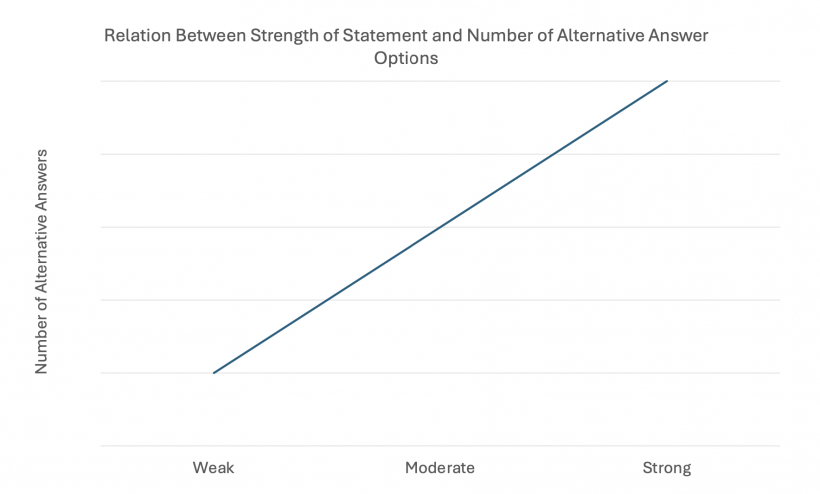
| Strength | Characteristics | Number of options | Example |
|---|---|---|---|
| Weak | Neutral or mild. Doesn't trigger strong emotions or opinions. | 1–2, because users are unlikely to react strongly. | "You can change the settings any time in the app." → "Okay, thank you." |
| Moderate | More engaging. Likely to trigger a range of moderate reactions. | 2–3, to cover the basic range of reactions. | "Do you find this information helpful?" → "Yes, it's helpful." / "No, it's not helpful." / "I'm not sure." |
| Strong | Highly engaging. Likely to trigger strong emotions or opinions. | 3 or more, to cover the full range of feelings and prevent reactance (users feeling pressured or limited by the options and reacting negatively). | "How do you feel about this new feature?" → "I love it." / "It's okay." / "I dislike it." / "I have no opinion." |
5. Include Neutral and Open Options
To avoid user reactance, add neutral options (e.g., "I don't know", "None of these apply to me", "Another situation") or open-ended options where users can type their own answer. This is especially helpful when your categorical options can't cover every possible answer.
Example 1: Neutral option
Scenario: Asking about the user's experience with a new feature.
Question: "How do you feel about the new feature?"
- "I love it."
- "It's okay."
- "I dislike it."
- "I have no opinion." (neutral option)
Example 2: "Other" option with free text
Scenario: Finding out why a user didn't like a health literacy lecture.
Question: "Why did you not like this health literacy lecture?"
- "It was too long."
- "It was boring."
- "It was too superficial."
- "It was not relevant to me."
- "Other reasons..." ("other" option)
Follow-up question: "Would you tell me these reasons?"
- [Free text input]
Only use free text when you need it: You only need a free text input if you require the exact answer, either for analytics or to guide the rest of the coaching flow. Otherwise, a predefined "Other" option is usually enough.
6. Balance the Number of Response Options
Many and open response options give you detailed insights and can increase user satisfaction and engagement. But they also increase cognitive load and decision fatigue for users, and they take more effort to create.
| Aspect | Many, open options | Few, restricted options |
|---|---|---|
| Insights | Detailed | General |
| User reactance | Reduced | Potentially higher |
| User satisfaction / engagement | Potentially higher | Reduced |
| Cognitive load for users | Higher | Lower |
| Decision fatigue for users | Potentially higher | Lower |
| Effort for the coaching creator | High | Low |
More options are not always better. To decide whether to personalize the coaching flow in detail and offer many and/or open options, ask yourself:
- Do I need specific, accurate answers to guide the next steps of the coaching flow?
- Do I need precise answers for data analytics?
7. Add Single-Option Responses ("Placebo Responses")
Single-option responses give the user only one option to continue. They are useful to:
- give the coaching dialogue a clear structure,
- make the conversation more interactive, so users feel more engaged,
- let users control the pace of the conversation.
Rule of thumb: The coach should not send more than three messages in a row without giving the user a chance to respond.
Use only mild or neutral wording for single-option responses (see section 4.2).
❌ Inappropriate single-option responses
These assume too much agreement or enthusiasm. They may not match how the user really feels and can disrupt the flow of the dialogue:
- "That sounds great!"
- "I can't wait to start!"
- "Sounds familiar to me!"
✅ Appropriate single-option responses
These are neutral and inviting. They keep the conversation going without assuming too much about how the user feels:
- "Okay!"
- "Let's continue."
- "Alright, tell me more."
- "Can you explain it?"
- "Why is that the case?"
Well-chosen single-option responses make the conversation feel more natural and less forced. This keeps users engaged and helps the dialogue flow smoothly.